
如何選擇 GPU
GPU Selection
For information on troubleshooting performance bottlenecks, refer to this document. Additionally, please note that Ampere-architecture cards such as the 3060, 3090, 3080 Ti, 4090, 4090D, A4000, A5000, A40, A100, A800, L20,H20, H800, and other Ampere-architecture cards require CUDA 11.1 or higher to function (Titan Xp, 1080 Ti, 2080 Ti, P40, and V100 have no such requirement); please use a higher version of the framework.
The WebCal platform allocates GPUs, CPUs, and memory as follows: CPU and memory are allocated proportionally based on the number of GPUs rented. The CPU and memory values displayed in the computing power marketplace represent the amount allocated per GPU; if two GPUs are rented, the CPU and memory are doubled. Additionally, GPUs are not shared; each instance has exclusive access to its GPU.
I. Selecting a CPU
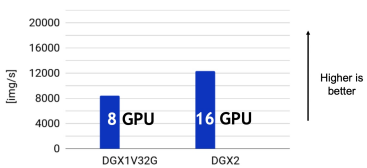
The CPU is extremely important! Although the CPU does not directly participate in deep learning model computations, it must provide data processing capacity that exceeds the model training throughput. For example, an 8-card NVIDIA V100 DGX serverachieves a throughput of 8,000 images per second when training ResNet-50 for ImageNet image classification, whereas a DGX2 server scaled to 16 V100 cards does not reach twice that throughput, indicating that the CPU of this DGX2 server has become the performance bottleneck.
We typically allocate a fixed number of CPU logical cores to each GPU. Ideally, model computation throughput scales linearly with the number of GPUs, and a reasonable allocation of CPU logical cores for a single GPU can be scaled directly to a multi-GPU setup. The WebCal platform’s computing instances offer a variety of CPU allocation specifications.Each GPU should be equipped with at least 4–8 CPU cores to support multithreaded, asynchronous data reading. Allocating more cores typically does not yield significant additional benefits; at this point, data reading bottlenecks usually stem from the overhead of process switching and data communication in Python (such as when using PyTorch DataLoader).So how can you save money while overcoming data read bottlenecks? Why not try the NVIDIA DALI data read acceleration library—written in C++ and CUDA—on the WebCal platform?In our tests, the data reading performance of a single-core CPU instance surpassed that of an eight-core Python-based instance, truly ensuring smooth model training.
All WebCal machines are equipped with high-performance CPUs, with the following being among the highest-performing:
- AMD EPYC 9K84 CPU used in H20-NVLink in Zone A, Beijing
- Xeon(R) Gold 6430 CPU used in Room 4090, Zone B, Beijing
- AMD EPYC 7763 CPU used for A100 in Zone A, Inner Mongolia
- Xeon(R) Platinum 8352V, Xeon(R) Platinum 8358P, and Xeon(R) Gold 6430 CPUs used in Zone B, Inner Mongolia 4090
- Chongqing Zone A, 4090D: Xeon(R) Platinum 8474C and Xeon(R) Platinum 8481C CPUs
- Northwest Zone B: AMD EPYC 9654 and AMD EPYC 9754 CPUs used in 4090 and 4090D
- L20 Zone: Xeon(R) Platinum 8457C CPUs used in L20 and H20-NVLink
Server CPUs generally have lower clock speeds than desktop CPUs but feature a higher number of cores. Therefore, when switching from a desktop CPU to a server CPU, you need to fully utilize the multi-core performance; otherwise, you won’t be able to take full advantage of the server CPU’s capabilities. To learn how to do this, click here
II. Selecting a GPU
The WebCal platform offers a wide variety of GPU models. We have broadly categorized them into five groups based on GPU architecture:
- GPUs based on the NVIDIA Pascal architecture, such as the Titan Xp and GTX 10 series. These GPUs lack hardware acceleration for low-precision calculations but offer moderate single-precision computing power. Because they are inexpensive, they are well-suited for training small models (such as CIFAR-10) or debugging model code.
- GPUs based on the NVIDIA Volta/Turing architectures, such as the GTX 20 series and Tesla V100. These GPUs are equipped with Tensor Cores specifically designed to accelerate low-precision (int8/float16) computations, but their single-precision computing performance has not improved significantly compared to the previous generation.We recommend enabling mixed-precision training for deep learning frameworks on your instances to accelerate model computations. Compared to single-precision training, mixed-precision training typically provides more than twice the training acceleration.
- GPUs based on the NVIDIA Ampere architecture, such as the GTX 30 series, Tesla A40/A100, and others. These GPUs are equipped with third-generation Tensor Cores. Compared to the previous generation, they support the TensorFloat32 format, enabling direct acceleration of single-precision training (which is enabled by default in PyTorch). However, we still recommend using float16 half-precision training models, which offer significantly higher computational power and deliver more substantial performance gains than the previous generation of GPUs.
- Cambricon MLU 200 Series accelerator cards. Model training is not currently supported. To perform model inference using this series of accelerator cards, quantization to int8 is required. Additionally, a deep learning framework compatible with Cambricon MLU must be installed.
- Huawei Ascend Series accelerator cards. Supports model training and inference. However, the MindSpore framework must be installed to perform computations.
Selecting a GPU model is not difficult. For commonly used deep learning models, you can roughly estimate the performance of a GPU during training based on its computational power at the corresponding precision level. The WebCal platform lists and ranks the computational power of each GPU model, making it easy for users to choose the GPU that best suits their needs.
The number of GPUs to use depends on the training task. Generally, we aim to complete a single training run within 24 hours so that an improved model can be trained the following day. Here are some recommendations for selecting multiple GPUs:
- 1 GPU. Suitable for training tasks with smaller datasets, such as Pascal VOC.
- 2 GPUs. Same as a single GPU, but you can run two sets of parameters at once or increase the batch size.
- 4 GPUs. Suitable for training tasks involving medium-sized datasets, such as MS COCO.
- 8 GPUs. A timeless, classic configuration! Suitable for a wide range of training tasks and very convenient for reproducing results from research papers.
- I want more! Use it to train large-parameter models, perform large-scale hyperparameter tuning, or complete model training in record time.
III. Selecting Memory
This generally does not affect performance when sufficient memory is available. However, WebCal instances have stricter memory usage limits than local computers (on a local computer, insufficient memory triggers the use of disk-based virtual memory, resulting in slower performance). For example, if a rented instance is allocated 64 GB of memory and the program ultimately requires 64.1 GB during training,at the moment this limit is exceeded, the process will be killed by the system, causing the program to terminate. Therefore, if you have high memory requirements, please select a host with more allocated memory or rent a multi-GPU instance.If you are unsure about memory usage, you can monitor memory usage in the instance monitoring console.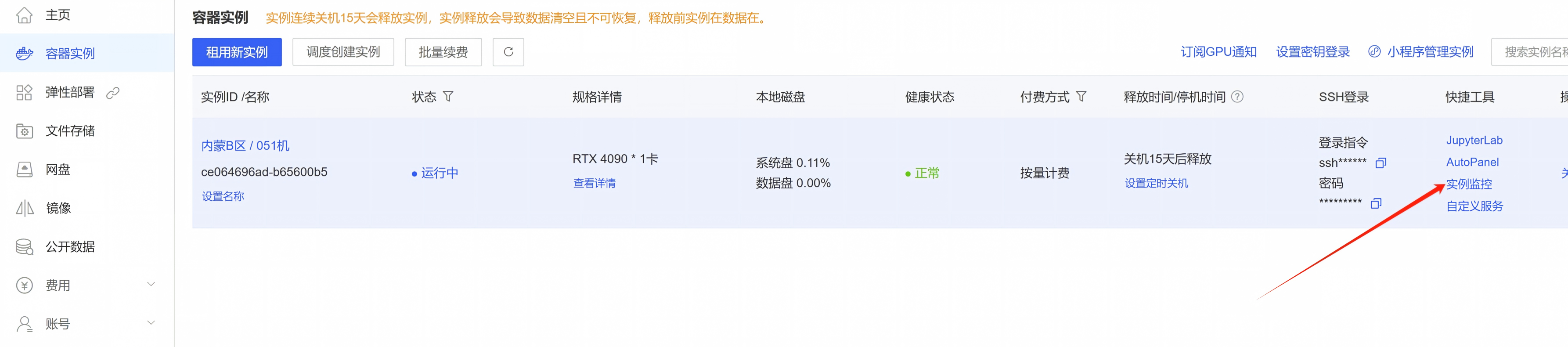
Appendix: GPU Model Overview
| Model | VRAM | Single Precision (FP32) | Half Precision (FP16) | Detailed Specifications | Description |
|---|---|---|---|---|---|
| Tesla P40 | 24GB | 11.76 T | 11.76 T | View | An older Pascal-architecture GPU that is an excellent choice for algorithms requiring large amounts of video memory and running on CUDA 11.x or earlier |
| TITAN Xp | 12GB | 12.15 T | 12.15 T | View | An older Pascal-architecture GPU, well-suited for beginners |
| 1080 Ti | 11GB | 11.34 T | 11.34 T | View | A card from the same era as the TITAN Xp; it’s also suitable for beginners, but the 11GB of VRAM can sometimes be a bit of a bottleneck |
| 2080Ti | 11GB | 13.45 T | 53.8 T | View | A Turing-architecture GPU with decent performance; among older-generation models, it is well-suited for mixed-precision computing. Offers good value for the price |
| V100 | 16/32GB | 15.7 T | 125 T | View | The former king of professional computing cards; its high half-precision performance makes it ideal for mixed-precision computations |
| 3060 | 12GB | 12.74 T | approx. 24T | View | If the 1080 Ti’s VRAM is a bit too tight, the 3060 is a good choice, especially for beginners. Requires CUDA 11.x |
| A4000 | 16GB | 19.17 T | approx. 76 T | View | Offers a balanced combination of GPU memory and computing power, making it suitable for intermediate-level work. Requires CUDA 11.x |
| 3080Ti | 12GB | 34.10 T | approx. 70T | View | A high-performance powerhouse; a great choice if you don’t have high VRAM requirements. Requires CUDA 11.x |
| A5000 | 24GB | 27.77T | approx. 117T | View | A performance powerhouse; if you find the 3080 Ti’s VRAM insufficient, the A5000 is a suitable choice, and its high half-precision computing power makes it ideal for mixed-precision computing.Requires CUDA 11.x |
| 3090 | 24GB | 35.58 T | approx. 71T | View | Can be considered an expanded-VRAM version of the 3080 Ti. Both performance and VRAM capacity are more than sufficient, making it highly versatile and the top choice for value. Requires CUDA 11.x |
| A40 | 48GB | 37.42 T | 149.7 T | View | Can be considered a version of the 3090 with expanded VRAM. Its computing power is roughly on par with the 3090, so choose based on VRAM size. Requires CUDA 11.x |
| A100 SXM4 | 40/80GB | 19.5 T | 312 T | View | The next-generation king of professional computing cards—it has no flaws except for its high price.With its large VRAM, it’s ideal for half-precision computing, and thanks to NVLink, it offers exceptionally high parallel acceleration when used in multi-card configurations. Requires CUDA 11.x |
| 4090 | 24G | 82.58 T | 165.2 T | View | The next-generation gaming flagship; aside from its relatively small VRAM and low parallel processing efficiency in multi-machine, multi-card setups, it offers excellent value for money |