
WebCal
Ctrl K

指南

Reset the system

指南整合常見問題支援
定價部落格
快速開始Top-Up and BillingAccelerating Access to Academic ResourcesQuick StartIntroductionMaintenance and TroubleshootingNetwork
平台資訊JetBrain ProjectorTmpWebCal Scholars Program @2026Introduction to the Public Beta/Suqian Zone AAbout UsCopying Data Between InstancesAnalysis of Server Performance MetricsTidal Computing PowerLoad Balancing
國產晶片Using Huawei MindIEHuawei Ascend NPUMooreThread GPU
環境設定CUDA/cuDNNMinicondaPython3.XInstalling DependenciesOverviewImages
企業進階功能Flexible DeploymentElastic Deployment Release NotesBest Practices for Elastic DeploymentPerformance Metrics Monitoring
容器實例JupyterLabRemote SSH ConnectionSave the imageScaling ConfigurationMulti-machine, multi-GPU parallel processingDaemonOverviewChange the billing methodMigration Example (Same Region)Migration ExamplesRemote DesktopReset the system
如何選擇 GPUGPU SelectionPerformance Testing
資料Upload DataDownload DataPublic DataPublic Cloud Storage (Highly Recommended)Compression / DecompressionFile StorageLocal data diskOverview
最佳實務FileZillaGitGromacsHuggingFaceKataGoLinux BasicsMPIOpenCLPyCharm Remote DevelopmentR (RStudio) InstallationSSH TunnelTensorBoardRemote Development with VSCodeVisdomVulkanXShellOpen PortsWeChat MessagesPerformanceExpose multiple servicesMoney-Saving TipsComputation Precision IssuesSoftware Sources

容器實例

Reset the system

2026/07/3082564 次瀏覽

Resetting the system or switching to a different image will restore the system to its initial state after the instance was created. Note that if you are using a community image or a custom image, resetting the system will restore it to the image’s original state; it does not delete all data in the environment, so the system disk will still be occupied.
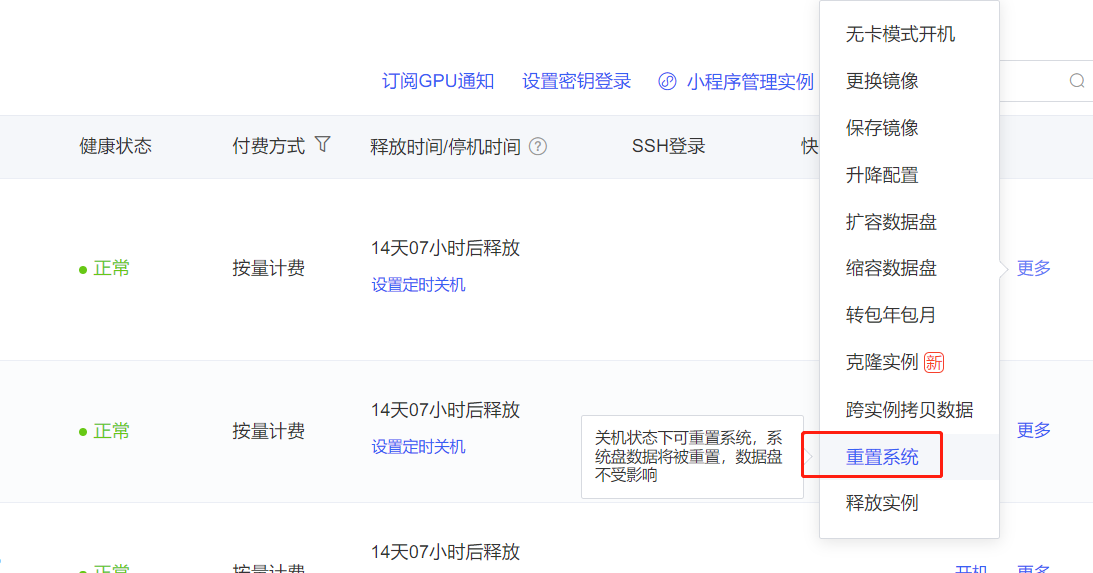
Resetting the system and replacing the image will erase the data on the system disk (Not sure what the system disk is? Please refer to this document). Data on data disks, cloud drives, and file storage will not be affected.

下一篇Remote Development with VSCode
WebCal文件返回指南