
WebCal
Ctrl K

가이드

Using Huawei MindIE

가이드통합FAQ지원
가격블로그
빠른 시작Top-Up and BillingAccelerating Access to Academic ResourcesQuick StartIntroductionMaintenance and TroubleshootingNetwork
플랫폼JetBrain ProjectorTmpWebCal Scholars Program @2026Introduction to the Public Beta/Suqian Zone AAbout UsCopying Data Between InstancesAnalysis of Server Performance MetricsTidal Computing PowerLoad Balancing
중국산 칩Using Huawei MindIEHuawei Ascend NPUMooreThread GPU
환경 설정CUDA/cuDNNMinicondaPython3.XInstalling DependenciesOverviewImages
엔터프라이즈 기능Flexible DeploymentElastic Deployment Release NotesBest Practices for Elastic DeploymentPerformance Metrics Monitoring
컨테이너 인스턴스JupyterLabRemote SSH ConnectionSave the imageScaling ConfigurationMulti-machine, multi-GPU parallel processingDaemonOverviewChange the billing methodMigration Example (Same Region)Migration ExamplesRemote DesktopReset the system
GPU 선택GPU SelectionPerformance Testing
데이터Upload DataDownload DataPublic DataPublic Cloud Storage (Highly Recommended)Compression / DecompressionFile StorageLocal data diskOverview
모범 사례FileZillaGitGromacsHuggingFaceKataGoLinux BasicsMPIOpenCLPyCharm Remote DevelopmentR (RStudio) InstallationSSH TunnelTensorBoardRemote Development with VSCodeVisdomVulkanXShellOpen PortsWeChat MessagesPerformanceExpose multiple servicesMoney-Saving TipsComputation Precision IssuesSoftware Sources

중국산 칩

Using Huawei MindIE

2026. 07. 30.40765회 조회

First, select the PyTorch MindIE image based on your version requirements:
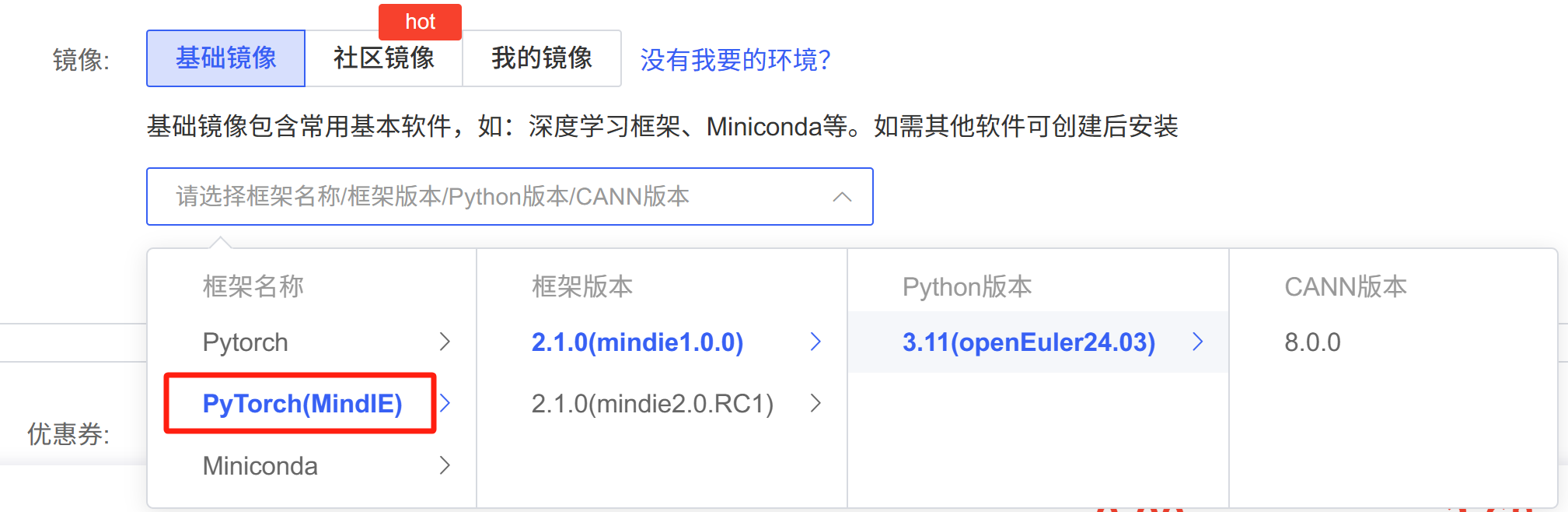
Then refer to Huawei’s documentation: Inference Service Deployment (DeepSeek-R1-Distill-Qwen-7B) - AI Service Deployment - Solution Deployment Guide - RAG Integrated Solution Reference Practice - Kunpeng RAG Development Documentation - Kunpeng Community

Huawei’s documentation streamlines the steps:

  1. Prepare the model

  2. Edit the /usr/local/Ascend/mindie/latest/mindie-service/conf/config.json file, primarily to modify the model paths and Device Index, among other things. It is also important to set the httpsEnabled field in the config file to false, as certificates are generally not used in this scenario.

  3. Load environment variables:

source /usr/local/Ascend/ascend-toolkit/set_env.sh
source /usr/local/Ascend/nnal/atb/set_env.sh
source /usr/local/Ascend/atb-models/set_env.sh
source /usr/local/Ascend/mindie/set_env.sh
source /usr/local/Ascend/mindie/latest/mindie-service/set_env.sh
  1. Start the service
cd /usr/local/Ascend/mindie/latest/mindie-service/bin
./mindieservice_daemon
다음 글Top-Up and Billing
Compute Rental 문서가이드(으)로 돌아가기