
ميزات المؤسسات
Best Practices for Elastic Deployment
Create a Deployment
If you need to perform a one-time task, we recommend using a Container/Job deployment type. If you are deploying a service, we recommend using a ReplicaSet deployment type, as ReplicaSet manages and maintains container node replicas—that is, if a container exits abnormally, the system automatically spins up a new container to replace it.When deploying a service, in addition to utilizing the features of ReplicaSet, you should also use service discovery and load balancing to enhance reliability and availability (see the section below).
Service Discovery and Load Balancing
When deploying a ReplicaSet-type elastic deployment, each container provides an independent, custom service address (using the HTTPS protocol) to serve external requests. Since a single point of failure in a container could cause the service to stop, and ReplicaSet-type deployments launch new containers to replace those that have stopped, it is necessary to dynamically deregister and re-register each container’s service address to ensure a highly available deployment.
Service discovery is generally divided into two types: client-side discovery and server-side discovery. For the sake of simplicity and ease of use, this section introduces a client-side discovery approach. This method is well-suited for GPU workloads (high computational load, limited GPU memory, and long response times per request) and is implemented in conjunction with load balancing. The architecture is as follows:
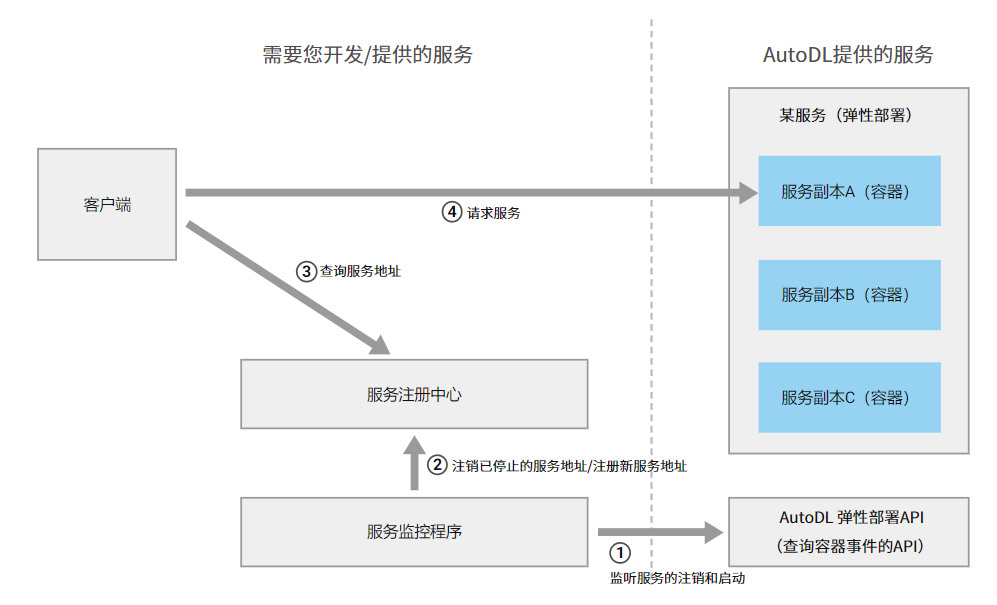
As shown in the figure above, the first step is to develop a service that uses the 查询容器事件 interface provided by WebCal to periodically poll and monitor the status of containers (which we will treat as equivalent to services for now). Any stopped containers are removed from the registry, and any new running containers are registered with the service center.
Finally, before calling the service, the client first retrieves a list of service addresses from the service registry, then selects one from the list based on the load-balancing strategy to make the service call. This demonstrates that load balancing can be performed simultaneously during this step.
Frequently Asked Questions:
Q1. Why doesn’t WebCal provide load balancing?
A1: If WebCal provides load balancing, it can simplify client-side usage. However, common load balancing solutions like Nginx have limited support for policies, making it impossible to precisely control GPU utilization based on business needs to reduce costs and improve efficiency.
Stop the container
When using ReplicaSet for elastic deployment, in addition to controlling the startup and shutdown of containers by setting the number of replicas, if you need to precisely stop a specific container, you can do so by calling the 停止容器 endpoint. This endpoint includes a decrease_one_replica_num parameter,which reduces the number of deployed replicas by one when stopping the container—meaning no new container will be started after this container is stopped (this parameter is valid for ReplicaSet deployments).
Block Faulty Machines
If you notice that containers scheduled to run on a particular host are frequently experiencing exceptions in a pattern, you can use the 设置调度黑名单 API to disable that machine.
Image and File Storage
At startup, the system pulls the image to launch the container. If the environment and other data files are static and do not require frequent changes, they can be stored within the image to avoid frequent image updates. Since each update involves recaching the image on every host, this can affect the time it takes to launch the container for the first time.
For files that change frequently, such as code and model files, we recommend storing them in file storage. As cross-instance shared storage, file storage is mounted to every container in the same region, so you can leverage this feature to simplify management and deployment.However, file storage also has drawbacks: its performance is slower than that of local disks, particularly when reading and writing a very large number of small files (KB-sized files), and the read/write bandwidth for large files is approximately 100 MB/s. If you need to improve performance, please contact customer service for assistance.
Startup Commands
- Once a container starts, it immediately executes the startup command you specified. When the command finishes, the container stops and is released; that is, the command’s execution lifecycle equals the container’s lifecycle.Therefore, taking the command
python app.pyas an example, do not run this command in the background, such aspython app.py &. Doing so will cause the command (parent process) to complete immediately and leave the program (child process) running in the background. However, since the command has finished, the system will stop the container, causing all processes to terminate together—failing to achieve the desired result. If you need to run it this way for specific reasons, here’s a workaround:python app.py &; sleep infinity - If the commands you run during startup are numerous and complex, we recommend writing a shell script in the image or file storage to consolidate these commands into a single script. This way, you can simplify the container startup process by having it execute that script instead, thereby reducing the risk of errors.
- Relative paths for execution commands: It is recommended to change to the appropriate directory before running the script. For example, for the command
python app.py, if theapp.pyscript is located in the/rootdirectory, the command should ideally be written ascd /root/ && python app.py. - When using a virtual environment with Conda, writing
conda activate my-env && python xxx.pyin a command typically results in a failure because the environment cannot be switched. We recommend changing it to/root/miniconda3/envs/my-env/bin/python xxx.py, which directly uses the Python interpreter within the virtual environment.
Debugging Exceptions
Example scenario: The container startup command is python app.py. After scheduling begins, the container starts up but terminates abnormally immediately afterward for an unknown reason.
Debugging method: Edit the deployment and change the container’s startup command from python app.py to sleep infinity. The purpose is to use the sleep command to block the container so that it remains running indefinitely. Once the container is running, log in using the container’s SSH command and manually execute the python app.py command within the container to check for execution errors and debug the issue. This allows you to efficiently pinpoint problems in an interactive manner.After debugging is complete, edit the deployment configuration to replace the command with the correct one.
Introduction to Key Features
Reusing Containers
When using elastic deployment, the most time-consuming step is pulling images; larger image sizes and a higher number of simultaneously scheduled containers can significantly impact startup time. Therefore, to reduce container creation time, elastic deployment supports reusing stopped containers. The specific implementation is as follows:
-
For containers that have been deployed and then stopped, the system automatically retains them for a certain period of time (determined by system policy, with a maximum of 7 days). These containers are placed in the pool of containers available for reuse.
-
When a new container needs to be created, the system first searches the pool of reusable containers for a stopped container that meets the current deployment criteria (based on parameters such as the image). If one is found, that existing container is started directly as the new container; otherwise, the system follows the standard process of pulling the image and creating a new container.
Differences between reusing and not reusing containers:
-
Regarding APIs: Except for the
reuse_containerparameter set during deployment, all other APIs are identical; internal differences are abstracted by the system. Therefore, using the reuse feature requires no changes to the code for other APIs. -
Data: When reusing an existing container, the system does not perform data cleanup on the original container (restoring it to the image’s initial state), so file data from the previous use of that container may remain.If this data affects the current run, you should delete it as appropriate based on your business requirements. Additionally, you can leverage this feature to reduce redundant file copies.
-
Environment Variables: The WebCalContainerUUID environment variable, which records the container UUID, is a unique value regardless of whether the container is reused; it will not use the UUID value from a previous container.
How to use:
Setting reuse_container to true when creating a deployment will automatically enable this feature. This feature takes effect at the deployment level and is not a global setting.