
البدء السريع
Top-Up and Billing
Top Up
The official WebCal website is the only authorized payment channel. Any payments made outside of the platform are unofficial. Please protect your personal assets and be wary of scams.
Currently supported payment methods include:
- WeChat and Alipay Top-ups (Discontinued)
- Business-to-Business (B2B) Wire Transfer
- USD Top-Up
- PayPal top-up will be available soon
Business Bank Transfer:
-
In principle, invoices are issued after the payment is received via corporate bank transfer. If you need to receive an invoice before making the payment, please contact customer service.
-
(Recommended) You can obtain a payment reference code or dedicated payment account on the Top-Up Page(The dedicated remittance account is available only for corporate-verified accounts receiving business-to-business transfers) to ensure automatic top-up to your WebCal account upon receipt of funds. If you do not use the remittance ID or dedicated remittance account, please contact customer service to have the funds manually credited to your account.
-
Domestic Bank Transfer: Please contact your regional manager or customer service.
-
International wire transfer account: Note: International wire transfers must be made via standard bank transfers from overseas. Please do not use overseas third-party payment providers (such as TransferWise Inc.,PingPong, PayPal, Payoneer, Airwallex, etc.) for foreign currency transfers, as these will not be credited to our account and may incur additional fees for refunds. If you do not use a standard bank transfer, you will be responsible for any additional refund fees incurred. Thank you for your understanding.
Beneficiary Bank: BANK OF NINGBO
Address: NO.345 NINGDONG ROAD,YINZHOUDISTRICT,P.R.CHINA,315042
SWIFT CODE: BKNBCN2N
Beneficary Name: SEETACLOUD TECHNOLOGY CO.,LTD
Beneficiary A/C No: 72202025000008701
Container Instance Billing
The WebCal platform supports two billing options: pay-as-you-go and annual/monthly subscriptions.
Pay-as-you-go
Note: Paid data disk expansion is billed separately and is not included in instance billing. Please refer to the billing rules for paid data disks below.
Billing Rules:
- Billing Calculation: Billing begins when the instance is started and ends when it is stopped. Cost = Duration × Unit Price; Duration = Stop Time – Start Time, calculated to the nearest second, with a minimum charge of 0.01 yuan (all data is retained for a period of time after the instance is stopped; please refer to for data retention rules).
- Billing Timing: Billing occurs once at the top of every hour and once when the system is shut down. The amount charged is the total cost for the billing cycle, with usage time calculated to the nearest second.For example, if the instance is started at 10:00 and shut down at 11:30, the system will charge for 1 hour at 11:00 and for 0.5 hours at 11:30.
- Note that billing duration is based on the instance’s power-on and power-off times, not on whether GPU computing was actually used,
Advantages:
- Flexible Features: Supports scaling up and down, expanding data volumes, migrating instances, and more
- Flexible Billing: Billing stops when the instance is shut down (all data is retained after shutdown).
Disadvantages:
- Pricing is slightly higher than annual or monthly plans
- The GPU is not reserved after shutdown. If there are insufficient idle GPUs on the host at the time of the next startup, you will need to wait or use alternative solutions (such as saving an image, migrating an instance, or GPU-less mode).
Annual and Monthly Plans
Billing Rules:
- Annual and monthly plans are prepaid; payment is due in full at the time of rental.
- Supports GPU rentals on a daily, weekly, or monthly basis
- When the annual or monthly subscription expires, the instance will be shut down (data remains unaffected); you can configure it to automatically switch to pay-as-you-go billing upon expiration.
- Renewal is supported, with renewal cycles available on a daily, weekly, or monthly basis. You can also switch to pay-as-you-go billing; see “Switching Billing Methods” below.
Advantages:
- Reserve a GPU—you don’t have to worry about other users taking it over when you shut down or switch images.
- It is relatively inexpensive and offers better value for long-term use.
Disadvantages:
- It is less flexible than pay-as-you-go billing; time is charged for the entire rental period regardless of whether the instance is powered on or off, or whether it is in use.
Change Billing Method
You can switch between pay-as-you-go and annual/monthly subscription plans. If you switch from an annual or monthly subscription to pay-as-you-go, you will receive a refund. The refund policy is as follows: Calculate the fees already incurred during the annual or monthly subscription period,with the unit price determined based on the duration of use. For example, if a 1-month subscription is switched to pay-as-you-go after only 8 days of use, the amount consumed will be calculated using the weekly rate (since usage exceeded 7 days). In this case, the amount consumed = weekly unit price × (8 days / 7 days),if you switch to pay-as-you-go after using the service for 3 days, the amount consumed = daily unit price × (3 days / 1 day). When deducting the amount consumed, any prepaid vouchers will be applied first; any remaining balance will be deducted from your prepaid balance; finally, any unused balance will be refunded.Please note that if there is a remaining balance after applying the voucher, no additional voucher will be issued. Based on the refund policy, the most cost-effective usage method is to opt for an annual or monthly plan and then switch to pay-as-you-go with a refund if you stop using the service; this ensures billing at a more economical unit price.
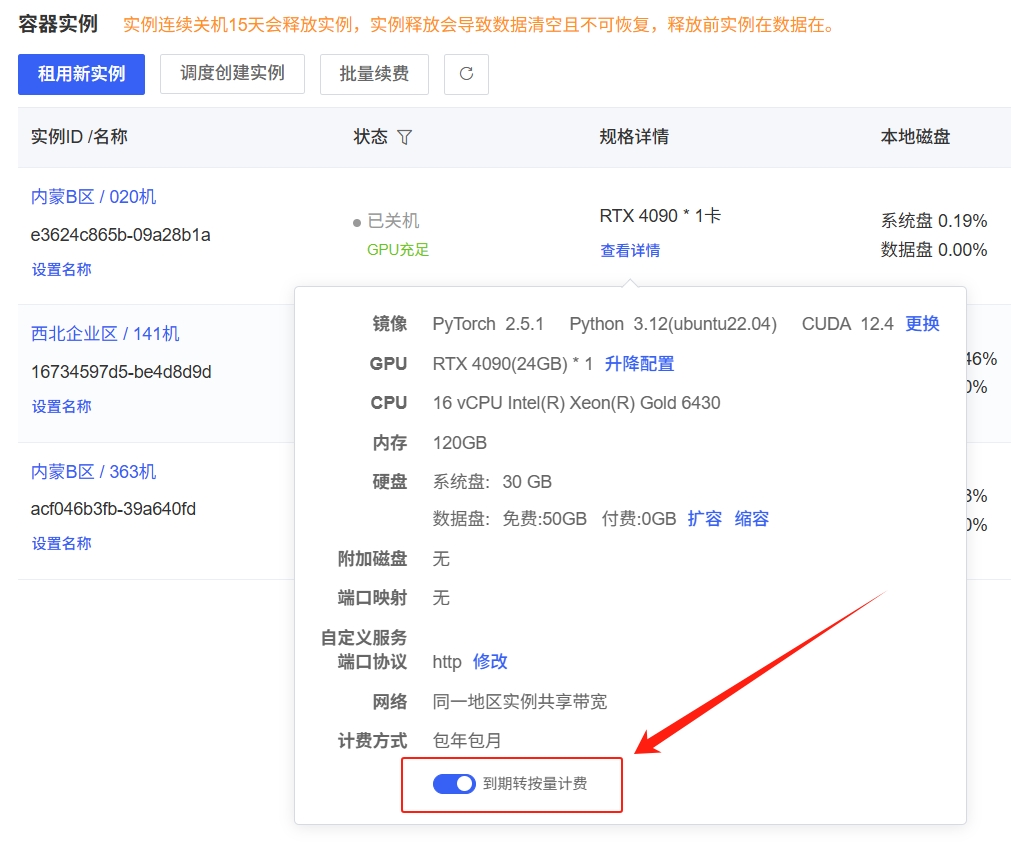
If you want an annual or monthly subscription instance to automatically switch to pay-as-you-go billing upon expiration without shutting down, you can enable “Switch to Pay-as-you-go upon Expiration” under “Console” > “Container Instances” > “View Details.”
Prices for Each GPU Model
Please refer to the current prices displayed on the website.
Billing for Data Disk Expansion on Instances
Billing rate: Please refer to the data disk unit price displayed for each host.
Billing Rules:
- If the instance is on a pay-as-you-go plan,paid data disks (if any) will be billed for that day’s usage at midnight the following day. Billing occurs once daily, and charges will apply regardless of whether the instance is powered on. If you no longer need the instance, click Scale Down Data Disk in the instance’s “More Actions” menu, or simply terminate the instance.
- If the instance is on an annual or monthly subscription plan, the paid data disk will be included in the total cost and paid in full at the time of rental. After the instance expires, the paid data disk will be billed according to the same rules as pay-as-you-go instances, namely: Charges for the current day are settled at midnight the following day, once daily, regardless of whether the instance is powered on, until the data disk is downsized to below the free capacity or the instance is released.
- If your account balance is insufficient, the system will prioritize retaining instance data for billing purposes and will not immediately terminate your instance. If your account is in arrears by more than 50 yuan,the platform reserves the right to delete data (though we will exercise caution when deleting user data due to its importance). If the platform fails to delete data promptly after the balance falls 50 yuan into arrears, resulting in continued charges, we will use a no-threshold voucher to cover the amount exceeding the 50-yuan arrears(For example: If the outstanding balance is 60 yuan, you may contact customer service to receive a 10-yuan voucher to cover the difference; if the outstanding balance is 20 yuan, the user will be responsible for covering the remaining amount.)
If you no longer need a paid data disk, you can click "Resize Data Disk" under "More Actions" for the instance. In this case, the billed capacity for that day will be equal to the maximum used capacity for that day. For example, if a paid data disk is expanded to 100 GB and then resized to 10 GB on the same day, you will be billed for 100 GB for that day.
File Storage Billing
Pricing is based on actual usage; usage under 20 GB is free.
Billing rate: ¥0.01/GB/day
Billing Rules:
- The system will use the maximum capacity used on a given day (calendar day) as the billable capacity. The fee for usage exceeding the free 20 GB allowance (yuan/day) = excess capacity (GB) × 0.01 yuan/GB/day. Fees are deducted at midnight the following day for the previous day’s usage.
- If usage exceeds the free quota, the minimum charge is 0.01 yuan.
- If your account balance is insufficient, billing will be prioritized to preserve your data, and your data will not be deleted immediately. However, if you have not logged in for three consecutive months or your outstanding balance exceeds 50 yuan,the platform reserves the right to delete the data (though we will exercise caution when deleting user data, given its importance). If the platform fails to delete the data promptly after the balance falls 50 yuan in arrears, resulting in continued charges, we will use a no-threshold voucher to cover the amount exceeding the 50-yuan arrears (for example: if the arrears total 60 yuan,you may contact customer service to receive a 10-yuan voucher to cover the difference; if the outstanding balance is 20 yuan, the user will be responsible for paying the remaining amount).
Total storage capacity: The default for a single user is 200 GB. Please contact customer service if you need more storage.
Example: If the maximum usage for the day is 50 GB, then the charge for that day = (50 - 20) × 0.01 = 0.3 yuan
Cloud Storage Billing
The cloud storage service is billed on a monthly prepaid basis and includes 20 GB of free storage.
Billing rate: ¥0.30/GB/month
Billing Rules:
- Under the Cloud Storage menu, click "Expand," select the expansion size and duration, and complete the capacity purchase.After the expiration date, the storage capacity will revert to the free 20GB limit. Data in the cloud drive will not be affected; however, if your usage exceeds the free quota at the time of expiration, the system will stop mounting the cloud drive to the instance until you either expand the capacity or delete data and restart the instance to restore the mount.
- If your account balance is insufficient, billing will be prioritized to preserve your data, and your data will not be immediately deleted. However, if you have not logged in for three consecutive months or your outstanding balance exceeds 50 yuan,the platform reserves the right to delete your data (we will exercise caution when deleting user data, given its importance). If the platform fails to delete your data promptly after the balance falls 50 yuan into arrears, resulting in continued charges, we will use a no-threshold voucher to cover the amount exceeding the 50-yuan arrears(For example: If you owe 60 yuan, you may contact customer service to receive a 10-yuan voucher to cover the difference; if you owe 20 yuan, you will be responsible for the remaining amount yourself.)
Image Billing
Transition Period for Rule Changes: The following new billing rules will not result in charges before February 15, 2023; they will take effect on February 16, at which point billing and charges will be calculated according to the new rules.
The default number of images that can be saved is 20. If you need more, please contact customer service. Billing for images is based on the total storage capacity of all images, regardless of the number of images.
Billing rate: ¥0.01/GB/day
Billing Rules:
- The system will calculate the billable capacity based on the (maximum capacity minus the free capacity) used on that day (calendar day).Usage up to 30 GB is free. The charge for usage exceeding the free 30 GB quota (RMB/day) = excess capacity (GB) × 0.01 RMB/GB/day. Charges are deducted at midnight the following day for the previous day’s usage. If usage exceeds the free quota, the minimum charge is 0.01 RMB.
- If your account balance is insufficient, billing will be prioritized to preserve your data, and your data will not be immediately deleted. However, if you have not logged in for three consecutive months or your outstanding balance exceeds 50 yuan,the platform reserves the right to delete your data (we will exercise caution when deleting user data, given its importance). If the platform fails to delete your data promptly after the balance falls 50 yuan into arrears, resulting in continued charges, we will use a no-threshold voucher to cover the amount exceeding the 50-yuan arrears(For example: If you owe 60 yuan, you may contact customer service to receive a 10-yuan voucher to cover the difference; if you owe 20 yuan, you will be responsible for the remaining amount yourself.)
Example: If the maximum usage for the day is 50 GB, then the charge for that day = (50 - 30) × 0.01 = 0.2 yuan
Billing for Elastic Deployment
Default billing rules:
- Billing Calculation: Billing begins when the container is started and ends when it is stopped. Cost = Duration × Unit Price; Duration = Stop Time – Start Time, calculated to the nearest second, with a minimum charge of 0.01 yuan.
- Billing Schedule: Billing occurs once at the top of every hour and once when the system is shut down. The amount charged is the total cost for the billing cycle, with usage time calculated to the nearest second.
- Note that billing does not begin based on whether the GPU is invoked, but rather on the container’s start and stop times.
Billing Rules for Time-Based Packages:
- After purchasing a time package, the container will first use the remaining time in the package to offset charges at checkout. If the remaining time in the package is insufficient to cover the usage time, the default billing method will be applied. Example:After creating an elastic deployment, you purchase time packages: 3090 for 1 day and 3080 for 1 day.This elastic deployment is scheduled to use 3090 and 4090 GPUs. When settling the bill for a container using a 3090 GPU, the remaining time in the purchased time package will be deducted first. For example, if the container used the GPU for 1 hour, the 3090 time package will be reduced by 1 hour(leaving 23 hours remaining), and the current billing amount is 0 yuan. If billing a container using a 4090 GPU, since no 4090 time package has been purchased, the container will be billed according to the default billing rules.
- Time-based package cancellation: Refund amount = the minimum of (total payment amount - amount consumed) and (total payment amount minus the portion paid via voucher). In other words, unused vouchers will not be refunded. Amount consumed = usage duration of the time-based package × unit price per hour for that GPU model.Here, if the usage duration is less than 24 hours, the consumed amount is calculated based on the pay-as-you-go rate; if it exceeds 24 hours, the consumed amount is calculated based on the daily package rate; if it exceeds one week, one month, and so on.
High-Speed File Storage
Pay a one-time fee based on the price corresponding to the purchase capacity and duration displayed on the webpage.
Pricing: The price displayed on the webpage for purchasing high-speed file storage capacity shall prevail.
Billing Rules:
- Purchase and renewal: Cost = Capacity (GB) × Duration (months) × Unit Price (yuan/GB/day). If you purchase 1 day, the calculation will convert that 1 day to a month by dividing it by 30.
- When renewing, the renewal capacity defaults to the current capacity. You may also reselect a capacity, but the new capacity cannot be less than the current used capacity or greater than the current purchased capacity. The new capacity will take effect immediately after reselection, even if the current purchased capacity has not yet expired.
- When scaling up, the billing rules for the scaled portion are the same as those for purchases and renewals.
- The system will not immediately delete your data when your purchased capacity expires, but storage will no longer be mounted once the purchase expires. The platform reserves the right to delete data 7 days after expiration (given the importance of the data, we will exercise caution when considering the deletion of user data).