
常見問題
GPU memory was not released
First, use the nvidia-smi command to check GPU usage. If you find that the program has closed but there is still GPU memory in use, this indicates that a residual process is occupying the memory. In that case, free it up as follows:
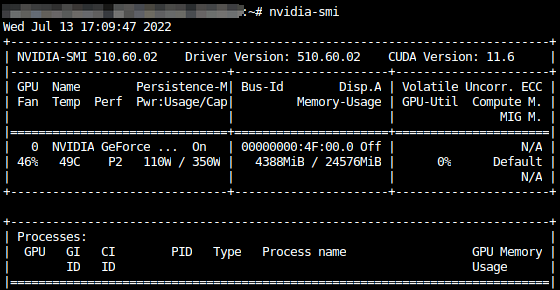
As shown in the screenshot, a program is using 4388 MiB of GPU memory. To free up this memory, first locate the process ID:
Use the ps -ef command
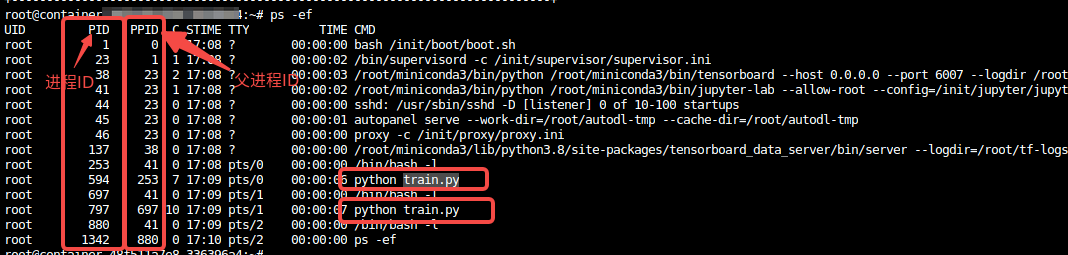
You can see three columns of important information: PID, PPID, and CMD, which represent the process ID, parent process ID, and the command used to start the process, respectively.
You can use commands to determine which processes were launched by your own program. For example, the process listed above as python train.py was launched by me; the others are either system processes or processes unrelated to GPU memory usage. Next, kill the processes:
As shown in the screenshot, the process IDs for the python train.py program are 594 and 797. You can use the kill -9 594 797 command to terminate these processes. However, there are often many processes consuming GPU memory, especially when running in parallel across multiple GPUs, making this method rather cumbersome. The following section describes a more powerful way to terminate processes:
As shown at ps -ef, my own processes all contain the keyword “train” (and other unrelated system processes do not, to prevent false positives). Therefore, I can use the grep command to filter out my own processes, for example:

Next, we’ll retrieve the process ID. You can use the awk command for this. The awk command has a complex syntax, so for now, just remember the following command:

Finally, use the kill command to completely terminate the process. The full command is ps -ef | grep train | awk '{print $2}' | xargs kill -9

The output above includes an extra error message stating "No such process," which can be ignored. This occurs because grep train also spawns a process, which is filtered out by the system.
Additional Notes:
The "|" symbol in Linux commands is called a pipe. Its function is to use the output of the previous command as the input for the next command (typically stdout; stderr requires separate handling).Pipes are extremely useful and can be applied in many scenarios. For example, suppose a folder contains tens of thousands of files, but only one is a .txt file while the rest are images, and you need to locate that specific file. Manually sifting through the list of files obtained by running ls would be very tedious, so you can instead use:
