
الأسئلة الشائعة
Cannot access the GPU
First, use the nvidia-smi command to check GPU usage
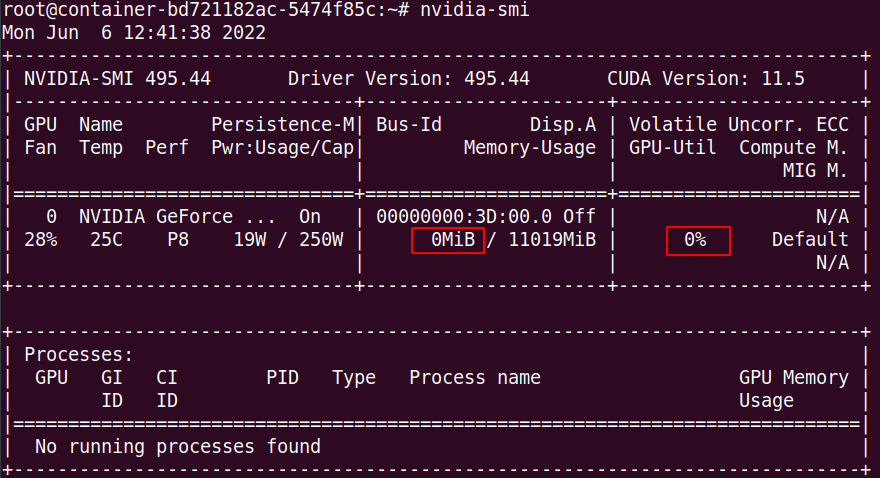
The red boxes above indicate video memory usage and GPU utilization, respectively. If, after the program starts running:
- If no GPU memory is being used, it is likely that the installed framework is the non-GPU version. To check:
# 如果你在用PyTorch
# 如果版本号中带cu字样,说明是cuda版本,否则是cpu版本
# 此外:使用Torch官方的conda安装命令在国内安装的一般为非cuda版本,而是cpu版本(有bug),因此推荐用pip安装,并且如果使用torch官方pip命令,去掉-f参数,这样可以走国内的pip源,速度更快
import torch
print(torch.__version__)

# 如果你在用TensorFlow 2.X版本
import tensorflow as tf
sys_details = tf.sysconfig.get_build_info()
sys_details["cuda_version"]

# 如果你在用TensorFlow 1.X版本
import tensorflow as tf
print("version:", tf.__version__)
print("compiler_version:", tf.__compiler_version__)
The figure below shows an example of a CUDA version with "cu" in the name.

-
If GPU memory is in use and the GPU utilization is not zero but fluctuates significantly, this indicates that the GPU is functioning normally. You can optimize your program to improve GPU utilization; refer to the help documentation.
-
GPU memory is in use, but GPU utilization remains at 0%. There are two possible scenarios for this: First, Ampere-architecture GPUs (such as the 30-series cards, A40, A100, A5000, etc.) require CUDA 11.X.The other scenario is when the code is not actually using the GPU; however, when importing the framework and building the network, the framework allocates GPU memory. This results in GPU memory being allocated but the GPU itself not being used. This situation can be verified using other code:
# 在终端执行以下命令,然后观察GPU的使用情况(注意该代码是Torch代码)
# 如果GPU使用率不为0,则证明你的代码可能未调用GPU进行计算,请检查调试代码。如果以下代码执行异常,请联系客服协助处理
wget http://webcal-public.ks3-cn-beijing.ksyun.com/debug/dp_res18.py
python dp_res18.py
- If the code above executes without errors but the GPU is still not in use, you can use the following code to test further.
# 如果用的PyTorch
import torch
print(torch.__version__)
torch.rand(1, device="cuda:0")

# 如果用的tf 2.x版本
import tensorflow as tf
with tf.device('/gpu:0'):
   a = tf.constant([1, 2, 3, 4, 5, 6], shape=[2, 3])
   b = tf.constant([7, 8, 9, 10, 11, 12], shape=[3, 2])
   c = tf.matmul(a, b)
   print(c)

# 如果用的tf 1.x版本
import tensorflow as tf
gpu_options = tf.GPUOptions(per_process_gpu_memory_fraction=0.4,
                            allow_growth=True)
config = tf.ConfigProto(gpu_options=gpu_options)

with tf.device('/gpu:0'):
    a = tf.get_variable('var_a', initializer=tf.constant(15.0))
    b = tf.get_variable('var_b', initializer=tf.constant(25.0))

with tf.device('/cpu:0'):
    c = a + b

with tf.Session(config=config) as sess:
    sess.run(tf.global_variables_initializer())
    result = sess.run(c)
    print(f"\n计算结果: {result:.1f}")
Error 1: RuntimeError: CUDA error: no kernel image is available for execution on the device. This indicates that this GPU requires a framework with a higher CUDA version. Error 2: RuntimeError: The NVIDIA driver on your system is too old. This indicates that the CUDA version you are using is newer than the version supported by your machine. Please use a machine with a newer version. For other errors, please contact customer service for assistance.